Mel
Implementing a User Interface (UI Design)
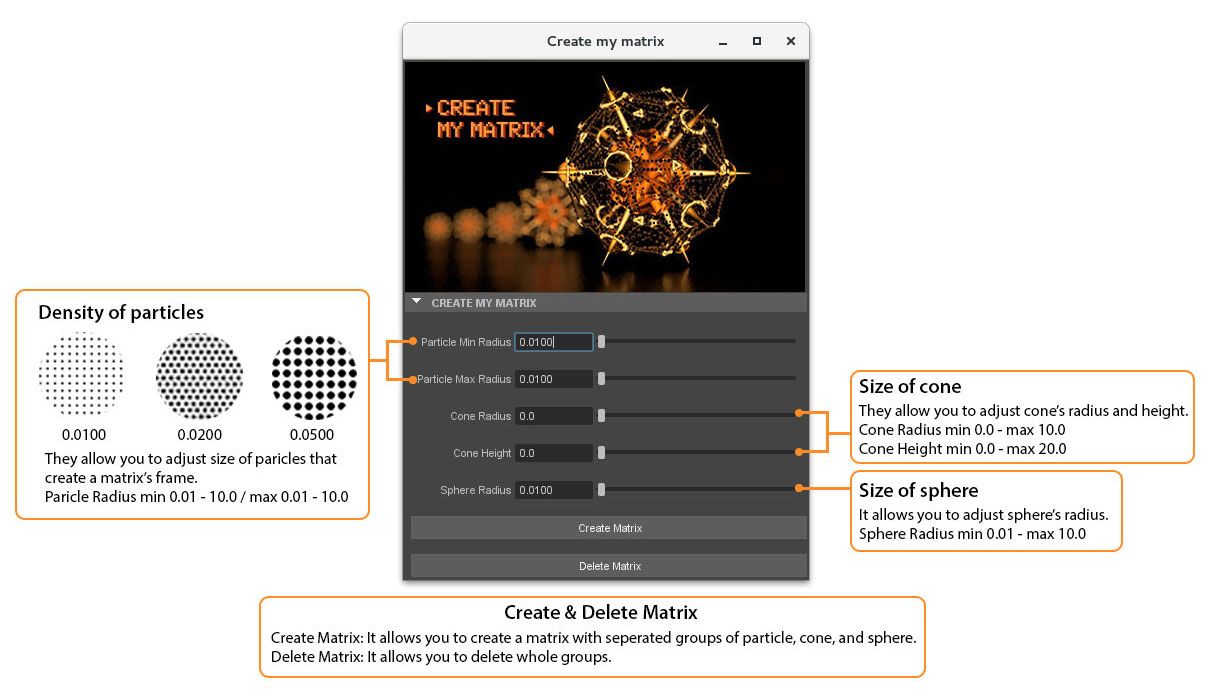
Haesu Kim [technical breakdown]
Mel
|
|
|
|
Introduction
You are to extend the code you developed for the matrix assignment
so that the shapes it creates can be modified by a user interface (UI). You
are NOT expected to develop a UI that will enable all aspects of the
geometries that comprise your matrix to be adjusted. It is left to you to
determine the "core" characteristics of your matrix that will be interesting
to have under the control of a user interface.
|
UI SpecificationsYour UI may work in one of two "modes". Mode 1: Adjust & CreateThe easiest mode is one in which a user makes adjustments to the widgets in your UI window and then clicks a button that creates a matrix based on the setting they have chosen. Mode 2: Create & AdjustA considerably more challenging approach is to implement your UI such that adjustments made to the widgets in the UI window all a user to make "live" updates to an existing matrix. |
What is Expected?The technical breakdown on your web page should explain how the items in your UI window (the widgets) work. It should also clearly state how it could be improved. |
GradingThe following categories will be used for grading your work. |
|